
You can open Telegram and view your chats, but the app will not let you terminate other sessions. If the message refers to a device you have just connected, the restriction may concern your current session. Signing in and being allowed to disconnect other sessions are separate operations.
In Telegram’s documentation, this restriction applies when less than 24 hours have passed since you signed in to the current session. The relevant time is not when you purchased the account, when its number was registered, or how long you have owned the phone. Start with the exact message and the connection from which you are trying to act.
If you discover a problem after a purchase, do not wait a day before reporting it. The current AKKUNO guarantee terms allow 1 hour from purchase for checking the account and require prompt reporting of problems. Telegram’s waiting period does not automatically extend that window.
Recognize the new-session restriction
The message usually appears in Devices or Active Sessions. You select a connection or the command to terminate the others, and Telegram says that a newly connected device cannot perform that action yet.
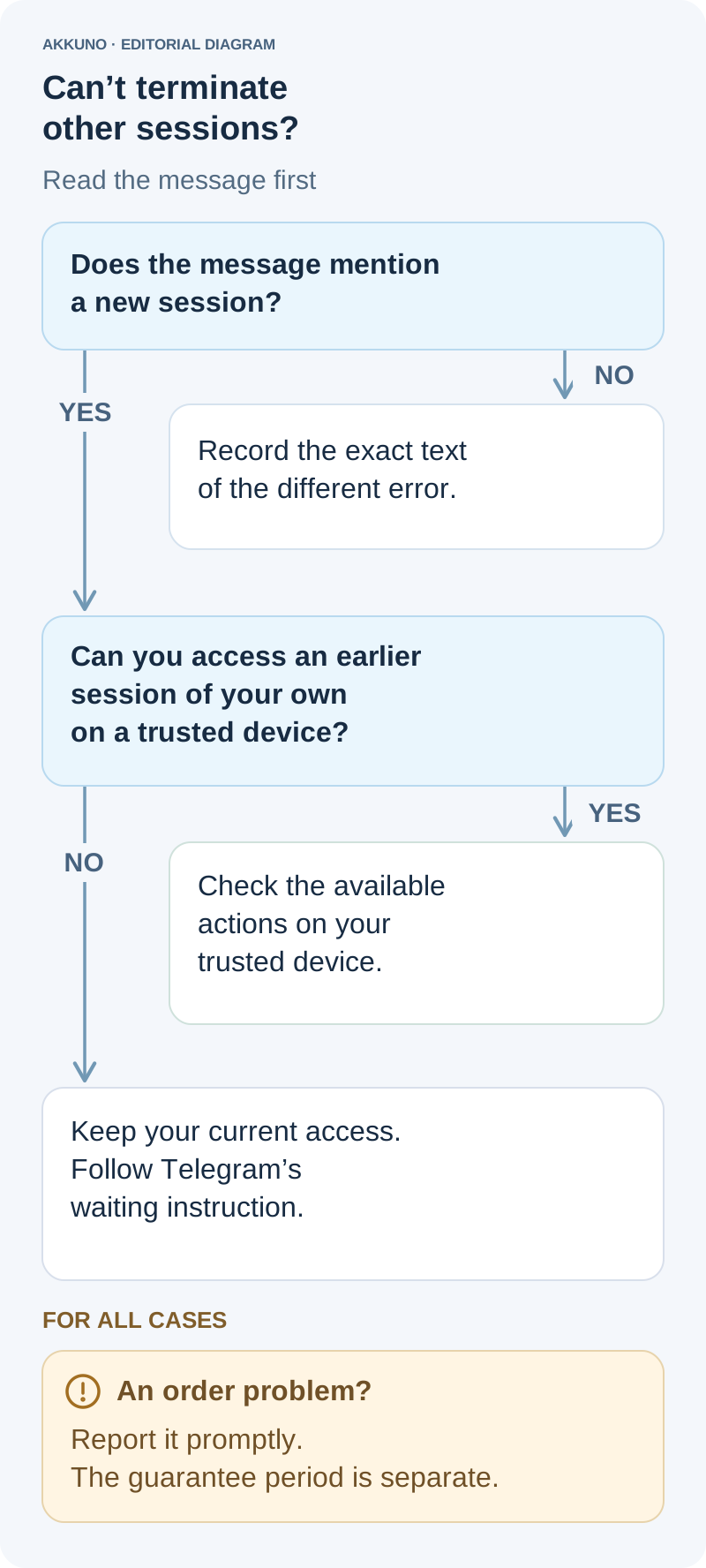
Record the complete message. It may suggest using an earlier connection or waiting a few hours. The restriction concerns session management; it does not necessarily prevent reading chats in the client that is already open.
The corresponding documented error is FRESH_RESET_AUTHORISATION_FORBIDDEN. You do not need to memorize the name to use Telegram, but it helps distinguish this case from unrelated restrictions. A message-sending limit, a missing login code and an error when transferring a channel’s ownership are different problems.
If you have not reached the device list and Telegram is still asking for a code or password, use the guide to Telegram’s verification prompts. If the message concerns a frozen account or another restriction, consult the account restrictions guide. A similar-sounding message is not enough to prescribe the same waiting period.
Which sign-in starts the 24-hour period?
The official documentation ties this restriction to the current authorization from which you are trying to terminate other sessions. Both the command for a selected session and the command for all other sessions document it.
| Time or date you are checking | What it describes | Does it establish this waiting period? |
|---|---|---|
| Creation of the current session | The sign-in that created the authorization in use | Yes: the current session matters |
| Last activity | When a connection was most recently used | It does not replace its creation time |
| Account registration | The age of the profile | It does not establish the current session’s age |
| Purchase | When the order was placed | It starts the store’s separate checking period |
| File download or extraction | An action involving the supplied data | It does not establish when server authorization occurred |
For example, the account may be several years old, and you may have owned the phone for years. If you completed a new sign-in today that created a new authorization, that session can still be considered fresh. Owning the device for a long time does not remove the restriction.
The reverse distinction matters too. Simply opening a client with an existing TData or SESSION is not automatically a new server-side sign-in. A file’s date and the time you launched the program do not prove when its authorization was created. Closing a window is also different from logging out.
The client’s phrase “a few hours” does not provide a separate exact countdown. The documented 24 hours apply to this particular restriction; they are not a promise that every other Telegram error will disappear after a day.
If an earlier session of your own is still available
Telegram suggests using an earlier connection. This means a session you can access on your own trusted device, where the intended account is already open. An older entry in the device list does not, by itself, mean that you control it.
Work through these checks:
- Open the existing client without logging out and signing in again. Confirm the intended profile, especially if the app contains several accounts.
- Review the device list and identify the connection you want to terminate. Other entries may include your own work devices; they are not automatically someone else’s sessions.
- Select the appropriate built-in action and read its confirmation before proceeding.
Terminating one selected session has a different scope from “Terminate All Other Sessions.” The latter keeps the current session—the one from which you selected the command—and terminates the others. If you act from your computer, the computer is the current session for that operation, not the new phone.
Do not ask a seller or another person to operate an “old session” for you, or send them access credentials. Using your own earlier connection is an option Telegram provides, but it does not guarantee that no other restriction applies.
If you only have the new session
Keep your current access and follow Telegram’s message. Avoid logging out, deleting client data or creating more sign-ins in an attempt to accelerate permission for the operation. Those actions do not make the authorization older, and a new sign-in can create another session.
Record when this particular sign-in occurred and the error you received. Last activity is not the right value for calculating session age: a working client can update that timestamp while remaining the same session.
If you have found a suspicious connection, waiting does not itself remove its access. Review the protective settings available to you and keep a record of the event without publishing secrets. The Telegram security guide covers the broader steps for protecting access.
Changing networks, buying an older account or actively sending messages are not documented conditions for lifting this restriction. Focus on the response to the specific operation and the state of the current session.
Check the result after waiting or using another device
Return to the intended action and check its result in the device list. Time passing does not execute the command for you. Other connections do not disappear automatically merely because your current session has become older.
If the action is still unavailable, record the new response. Check whether you signed in again and whether you are acting from the expected client. Do not interpret every continuing problem as a requirement to wait another day.
An incomplete login attempt waiting for a two-step password is also different from a fully connected client. The device name, app and timing help you review the list. Country and region are derived from an IP address and do not, by themselves, identify the person who connected.
Successfully terminating a selected session confirms the result of that operation. It does not establish exclusive ownership of the account or guarantee its future security.
If you discover the problem after a purchase
Compare the supplied access with the listing and the instructions for your order. A new-session restriction alone does not establish that the product is faulty. It also does not remove the need to report a mismatch or an unclear access state promptly.
When contacting AKKUNO support, include:
- The order number and purchased option.
- The client, version and device from which you attempted the action.
- The command you selected and the response you received.
- The time of the current sign-in, if known, and the time of the error.
- Whether another session of your own remains accessible.
An error screenshot should exclude login codes, passwords, delivery links and session files. Do not forward the entire package to explain an unfamiliar entry in the device list. Reporting a problem does not imply an automatic replacement.
Check each option’s stated access characteristics in the Telegram catalog. Account age and delivery format do not replace information about the current authorization or promise immediate control over every session.
Sources and verification
- Telegram API: account.resetAuthorization and auth.resetAuthorizations. Checked November 7, 2026.
- Telegram API: authorization — session creation, activity and status fields. Checked November 7, 2026.
- Telegram Translations: TerminateSessionFreshError and RecentSessions.Error.FreshReset, original English strings. Checked November 7, 2026.
- Telegram FAQ: managing devices, logging out and preserving access. Checked November 7, 2026.
- AKKUNO: current guarantee terms and guides to Telegram security and restrictions. Reviewed November 7, 2026.


