
A Telethon .session file is not a drop-in Pyrogram session. Both libraries use SQLite for their built-in file storage, but their loaders expect different layouts. Their session strings use different formats too. Renaming a file or placing a JSON file next to it leaves its internal structure unchanged.
When a client rejects a session, identify where it failed. Finding the file, reading its format and checking authorization with Telegram are separate operations. A file extension cannot tell you which one failed.
Identify what you have
A file session is a database created by a particular client. Its name often ends in .session. A session string is text in a library-specific format. Renaming a text file that contains a session string does not turn it into a SQLite database.
In a SESSION + JSON package, the separate JSON file may hold settings or other details. An importer may require both files as input. Check what the package documentation says the JSON is for. The presence of a matching pair does not establish whether the session came from Telethon or Pyrogram. For the broader distinction between TData, chat exports and session packages, see the Telegram format guide.
Why the same database engine is not enough
SQLite defines how to store and read the database. Each library defines which information it expects to find there. Both databases can contain a table named sessions and still have different columns.
We compared the source of Telethon 1.45.0 and Pyrogram 2.0.106. The Telethon layout includes server_address and port. The Pyrogram layout includes user_id, api_id and test_mode. Both have an auth_key column. That shared column does not give one library everything it expects from its own session file.
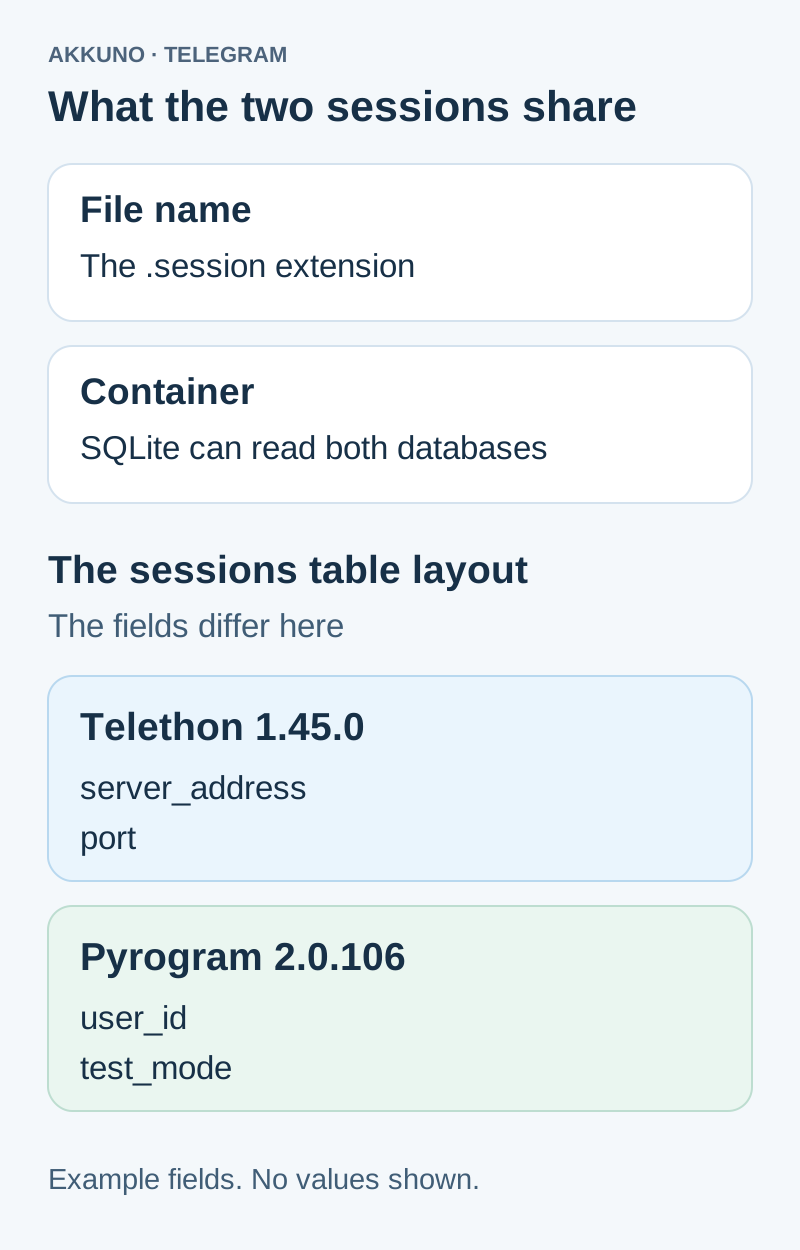
We created two empty databases with the corresponding layouts and queried individual columns. SQLite returned no such column: user_id for the Telethon layout and no such column: server_address for the Pyrogram layout. This demonstrates a schema mismatch. A real client may stop earlier, for instance while checking the database version. The test used no session strings, authorization keys or Telegram connections.
Can the other library read the session string?
Telethon StringSession and Pyrogram session strings encode their data differently. In the Telethon version we checked, the string includes a format marker and data for the server address, port and authorization. Pyrogram has its own fields and supports some older layouts. Similar-looking text and string length are insufficient to establish compatibility.
Check where the string came from and what the receiving program expects. Pyrogram can load its own string into in-memory storage. Telethon has its own StringSession implementation. Check forks separately. The original Pyrogram repository is archived, and a shared import name does not tell you which fork or release is installed.
Find the stage that failed
| Symptom | Stage to investigate | First check |
|---|---|---|
| File missing or client prompts for sign-in | Path or selected session | Working directory, file name and argument type |
| no such column or a database version error | Local layout | Library, version and storage that created the file |
| database is locked | Database access | Whether another process has the same file open |
| Telegram returns AUTH_KEY_UNREGISTERED | Server authorization | Whether the client is using the intended session and normal sign-in is available |
Treat these as starting points. A sign-in prompt alone does not show that Telegram revoked your original session. The client may have created a fresh local database after looking in the wrong directory. A readable database, in turn, does not establish that Telegram still accepts the authorization stored in it.
Check compatibility while preserving access
- Identify the program and version that created the file or string. For a Python project, check which package is actually installed in the environment running the client.
- Match the input type. An importer expecting a SQLite database cannot use an archive or a text file in its place. For a string input, check the library that produced it.
- Keep the original in private storage. If you inspect the layout of a session you control, use a local copy in read-only mode. The names of the tables and columns are enough for a layout check. You do not need their values.
- Use the matching storage when the intended program supports the source library and version. If you need a different client and can sign in normally, create a separate authorization there. Keep the working session until you confirm the new access.
Treat a session as a credential. Do not paste a string into a checker, bot or log or send a database as a troubleshooting attachment. See the account data protection guide for storage practices. If a new sign-in asks for confirmation, identify which code or password Telegram is requesting.
What to confirm about a SESSION + JSON package
Check the individual listing in the Telegram catalog. SESSION + JSON describes the package contents. If you require a specific library release or import method, confirm that before buying. Once you receive the package, compare the files with the order instructions promptly.
If the received format differs from the description, send AKKUNO support the order number, destination program and version, expected storage type and exact error message with secrets removed. These details are enough for an initial report. Keep the session files, strings, keys and sign-in codes private.
Sources and verification
- Telethon 1.45.0. Session Files, FAQ, and SQLite and StringSession source. Checked November 7, 2026.
- Pyrogram 2.0.106. Storage Engines and file and string storage source. Checked November 7, 2026.
- Telegram API. Authorization error documentation. Checked November 7, 2026.
- AKKUNO. Layout check with two empty SQLite databases. November 7, 2026.


